
Water Utilities

WaterSmart


Access the Kyle WaterSmart Portal

Access the Kyle WaterSmart Portal

With WaterSmart, you can:

  • View water use by month, week, day and hour
  • Review usage patterns over time
  • Receive automatic leak alerts
  • Set up custom alerts for higher-than-usual water use
  • Choose how to receive alerts, including email, text message or phone call
  • Check for possible leak activity
  • Get recommended actions when abnormal usage is detected
  • Update household information for more useful conservation tips and comparisons 
  • Add additional users, such as a family member, tenant or property manager
  • Find water conservation tips to help reduce unnecessary water use 


Getting started with WaterSmart is simple. 

  1. Visit the WaterSmart portal.
  2. Enter your Kyle Water Utilities account number and service address ZIP code.
  3. Select Find my account.
  4. Follow the prompts to confirm your account.
  5. Create your login using your email address and a secure password.
  6. Review your dashboard, household information and communication preferences.
  7. Add optional text message or phone call alerts and customize water-use notifications if desired.
  8. Returning users can select Log in to access their WaterSmart account.
  9. If your billing address is different from your service address, use the ZIP code for the address receiving water service. 


WaterSmart User Guides

The WaterSmart portal is designed to help customers view water use, understand usage patterns, check for possible leaks and manage alerts in one place. 

After registering, customers should review their dashboard, check communication preferences and make sure household information is accurate. This helps WaterSmart provide more useful alerts, recommendations and conservation tips. 
WaterSmart gives customers a more detailed look at water use between bills. Instead of waiting for the next billing cycle, customers can review usage patterns and see when water is being used at their home or business. 

Usage information can be viewed by month, week, day and hour. This can be especially helpful when checking outdoor watering, looking into higher-than-usual use, or trying to understand how water use changes throughout the month. 

WaterSmart is not a real-time monitoring system. Usage information may not appear immediately, but it can help customers review patterns and better understand water use between bills.

Making changes throughout the month and cutting out unnecessary usage can help you save money!

In WaterSmart, your usage chart shows how much water was used during a selected period of time. 

  • Normal water use is shown in blue. 

  • Possible leak activity may appear in orange. 

  • A spike in usage may show a period when more water was used than usual. 

  • Continuous use may mean water is running for a long period of time, or a sudden, large burst of water is detected, even when no one may be actively using water. 

The chart is a tool to help you take a closer look. It does not always mean there is a confirmed leak, but it can help point you toward something that may need attention.

If WaterSmart shows a possible leak alert, start by reviewing your usage chart and selecting the option to investigate the possible leak. 

WaterSmart can provide recommended actions and common places to check. Many possible leaks are caused by simple issues, such as a running toilet, dripping faucet, irrigation system issue or hose left on. 

A running toilet is one of the most common causes of continuous water use and can often be a quick fix. Customers may also want to check: 

  • Indoor faucets 
  • Outdoor faucets and hose bibs 

  • Irrigation systems 

  • Water softeners 

  • Pool fill lines 

  • Appliances connected to water lines 

If you find a leak on private plumbing, you may need to contact a plumber or irrigation professional. 

If you see a water main break, major leak in the street, loss of water service or another urgent water issue, please contact Kyle Water Utilities. 

Water Division
Crews are on call 24/7, including holidays.

  • Office hours (8 am - 5 pm): 512-262-3024

  • Emergency after hours and holidays: 512-787-9896

Kyle Water Utilities customers are already set up to receive leak alerts through WaterSmart. 

Customers can update communication preferences to choose how they want to receive notification (via email, text or voice), and turn on other notifications, including alerts for higher-than-usual water use. 

Keeping your communication preferences up to date helps make sure you receive the alerts that are most helpful to you. 

To update your preferences, log in to WaterSmart, select Settings, then choose Communication Preferences. 

WaterSmart includes water conservation tips and usage insights that can be more helpful when your household information is accurate. 

Keeping information such as the number of people in your household up to date helps WaterSmart provide more relevant recommendations and usage comparisons. 

For example, a household of four may use water differently than a household of one. Accurate information helps make the tips and insights more useful for your account.


Leak Alert FAQs

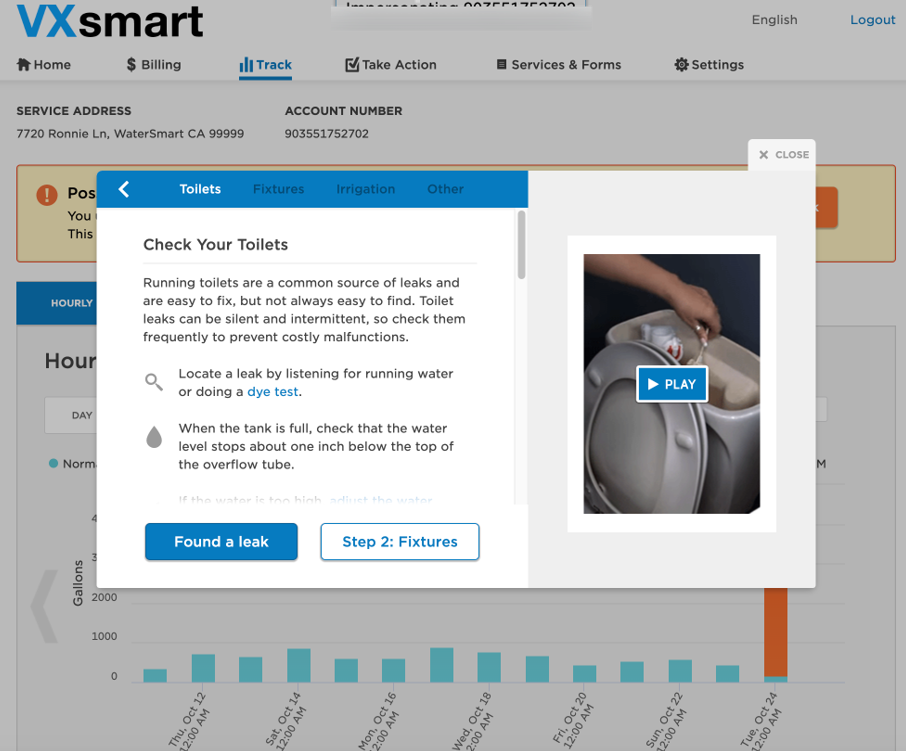
WaterSmart provides a guide for checking the most common culprits. Start with these common causes of continuous water use, especially toilets. A running toilet is one of the most common causes of unexpected water use and may be easy to fix. Customers should also check faucets, outdoor spigots, irrigation systems, water softeners and other water-connected fixtures. If you think you stopped the leak, give your meter time to show the leak has resolved, otherwise you may need to keep hunting. While not all leak alerts mean there is a leak, it does mean water is being used. If you can't find the leak, it might be time to call a plumber.

Need a toilet repair kit? We have a rebate for that!

Image provided by VertexOne for training purposes.


Kyle Water Utilities customers are already set up to receive leak alerts through WaterSmart. Customers can log in and update communication preferences to add other alert methods, such as text message or phone call, and turn on additional notifications. We highly recommend carefully setting up these notifications, as they can help save you money.

Log in to WaterSmart, select Settings, then choose Communication Preferences. From there, you can choose how you want to receive alerts and updates. First, you will need to ensure all your contact information is correctly entered.

WaterSmart FAQs

WaterSmart is a secure online customer portal from Kyle Water Utilities. It connects with the City’s smart water meter system to help customers view water use, check for possible leaks, receive alerts and find water conservation tips.

Your smart meter records water use and sends that information through the City’s secure meter system. WaterSmart turns that information into charts, alerts and conservation tips so you can better understand water use at your home or business. The volume of water and time of use are recorded and displayed for you to review any time through your portal, so you can be confident in your water usage, even in the middle of a billing cycle. Kyle Water Utilities also receives this information for billing and leak detection purposes, to ensure the water supply for all customers.

You will need your Kyle Water Utilities account number and the ZIP code for your service address. If your billing ZIP code is different, use the ZIP code for the address receiving water service.

This system is only for City of Kyle's municipal water utility. Some city residents may receive their water from a different utility. Find your utility provider using the jurisdiction lookup tool.

Yes. WaterSmart is available to Kyle Water Utilities customers at no additional cost. We want our customers to be empowered to monitor and track their water usage, and to be alerted to potential leaks and unexplained water use to help them conserve water and save money.

WaterSmart gives customers detailed water-use information, including usage views by month, week, day and hour. Usage information may not appear in real time, but it can help customers review patterns and better understand water use between bills. Please give 24 hours for water use data to populate.

Hourly usage shows how much water was used during each hour shown in the portal. This can help customers see when water use occurred, such as during outdoor watering, overnight use or other periods of higher activity. (Note: Due to bandwidth limits, hourly usage is not displayed on mobile devices. Please use a desktop or laptop computer to view this level of information.)

Challenge: Mark the time when you take your next shower, bath, or water the garden. Then, check the portal the next day to see how much water that activity used. You might be surprised how much, or how little, water that certain activities use.

Like to take long showers? Consider a low-flow showerhead - we will even pay you for it!

Orange may indicate possible leak activity or continuous use detected by WaterSmart. If you see orange on the chart or receive a possible leak alert, review your usage and follow the recommended actions in the portal.


Image supplied by VertexOne for training purposes.


Not exactly. WaterSmart shows water-use patterns from your smart meter. It may help you identify when water was used and whether the pattern looks unusual, but it does not show exactly which toilet, faucet, appliance or irrigation zone used the water.

WaterSmart does learn from your water use patterns, and can assess that you were likely washing laundry, irrigating the yard, or other activities that can be estimated based on water volume and time. This is what makes WaterSmart so intelligent!

Yes. Customers can add additional users, such as a family member, tenant or property manager. Additional users can be managed in the WaterSmart portal under settings.

Accurate household information helps WaterSmart provide more relevant water conservation tips, recommendations and usage comparisons. Depending on how many people live at an address can affect the expected volume of water used. We highly recommend updating this information for the most accurate data.

WaterSmart does not change the City’s water rates or billing structure. It gives customers more information about water use so they can better understand usage between bills. With WaterSmart, you have even more control over your bill.

The WaterSmart welcome screen includes a Pay my bill option that links customers to the city's payment portal. Customers may also continue using the City’s regular utility billing payment options.

WaterSmart is an information and alert tool. It does not automatically disconnect water service based on usage shown in the portal. Any account or service issue would continue to follow Kyle Water Utilities’ regular customer service, billing and notification processes.

WaterSmart is a secure customer portal. Smart meters transmit water-use information needed to support meter reading, customer usage views, alerts and utility service functions. This transmission does not include sensitive customer information.

WaterSmart does not currently offer an official app, but the WaterSmart portal is mobile-friendly and can be used through a standard phone web browser, such as Google Chrome or Safari.

For help registering or using WaterSmart, contact Kyle 3-1-1. 

For urgent water issues, such as a water main break, major leak or loss of water service, contact: 

Water Division:
Crews are on call 24/7, including holidays.

  • Office hours: 512-262-3024

  • Emergency after hours and holidays: 512-787-9896

For billing questions:

Utility Billing: 877-829-9041

Sign up for our Newsletter

Stay up to date on the city's activities, events, programs and operations by subscribing to our eNewsletters.